Serene: A writing assistant that lives where you write.
Serene is a Chrome extension that works inside the text fields you already use. Not a separate writing canvas. Not another tool to switch between. Just a quiet second layer over the writing already happening — in Gmail, LinkedIn, Notion, and wherever else your words need to land.
Type
Chrome Extension
Area
Product Design
Year
2026

Serene
For the five seconds before send
The Problem
Almost right, but not quite ready to send.
The message was clear in my head. The draft just needed one more pass.
I would write something, read it back, and feel it was almost right — too long in places, a bit cold, correct on the surface but stiff in a way that mattered. The usual fix was clumsy: copy the text, open a separate AI tool, paste it, rewrite it, copy it back, then edit again so it still sounded like me.
That workflow worked. But for something as routine as an email or a LinkedIn reply, it felt disproportionate. Like fixing a small typo using a spell-checker in a different building.
Writing happens inside real contexts — Gmail, LinkedIn, Notion, support replies, product updates, everyday messages. The assistant did not need to live somewhere else. It needed to be in the field where the writing was already happening.
That gap became the starting point for Serene.

The Product
It does not write for you. It gives your draft a second read.
Serene is a Chrome extension that works inside the text fields you already use. It reads your draft, offers a rewrite, and waits for your decision before changing a single word. The original text stays untouched until you say otherwise.
The idea was to design a tool that helps without taking over. One that stays in the background until it is useful, then steps aside once it has done its job.
Design Decisions
Staying inside the writing flow.
The first and most important constraint was staying inside the writing context without disrupting it.
Most AI writing tools work by pulling you into a new surface: a sidebar, a separate editor, a dedicated app. Serene needed to do the opposite. It had to feel like a light layer placed over writing already in progress, not a destination in itself.
This shaped almost every interaction decision that followed. The assistant lives inside the text field. The suggestion appears inline. The user never has to leave the compose window.

Awareness without interruption.
One of the early questions was whether Serene should prompt the user or wait to be called.
A proactive approach made sense, but only if it communicated without creating noise. The inline status indicator became the answer: a small signal that lets the user know whether their text may benefit from a grammar pass, a tone adjustment, or no significant change at all.
The three states are visual rather than textual. The goal was to give the user useful awareness without pulling their attention away from the writing itself.
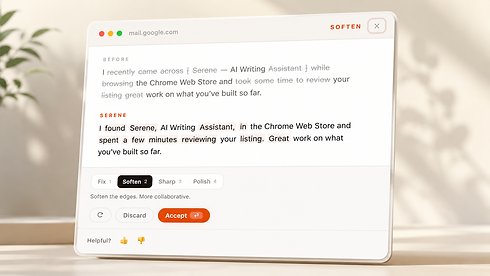

Suggestions before changes — always.
A key decision early in the process was that Serene would never rewrite automatically.
The product had to earn the change. The suggested rewrite appears in a card alongside the original, and the user makes the call: accept, discard, or ask for a different version. Nothing replaces the original text until the user decides it should.
That constraint shaped the entire trust model. The user stays in control of every word. Serene offers. It does not decide.

Modes that feel like a choice, not a setting.
Four modes. Each one needed to feel like a distinct decision rather than a minor variation on the same output.
Fix and Humanize handles grammar, clarity, and natural phrasing. Humanize makes text feel less mechanical and more personal without changing the meaning. Sharpen compresses the message for impact. Polish refines structure and flow for longer, more considered writing.
The design challenge was legibility at a glance. The user should be able to choose the right mode in two seconds without reading a guide. The mode names and their short descriptors carry all the weight.

Making privacy legible, not technical.
Serene uses a BYOK model: bring your own OpenAI API key. The key stays on the user's device. Drafts are never stored. Usage is transparent, and the user pays the API provider directly at cost.
Explaining this without making it feel like a developer feature took several rounds of iteration. The privacy language needed to be honest without being dense, reassuring without being defensive.
The goal was to make trust a visible part of the product experience rather than a footnote buried in documentation.
My Role
Founder-led, end to end.
Serene was a founder-led product from the first concept to public launch. My role covered product thinking, UX strategy, interaction design, visual design, product copy, mode definition, privacy positioning, early testing, and launch communication.
I defined the core product direction — a writing assistant that works inside existing writing contexts rather than creating a new one — and designed the key interaction model: auto-analysis after typing pauses, inline status indicators, rewrite modes, suggestion cards, and a lightweight usage dashboard.
The product was built end to end: from the initial UX architecture to the Chrome extension experience, visual system, product copy, website, and Product Hunt launch.
The values embedded in Serene reflect the way I think about design more broadly — clarity, control, trust, and usefulness that does not demand attention.
Early Signal
Honest, qualitative, and still forming.
Serene launched publicly on Product Hunt with a live product website and a small free tier. Users can run a limited number of rewrites before choosing to continue with their own API key.
The early signal has been qualitative. The frustration of copying text between tools is immediately recognisable to almost anyone who regularly explains something in writing. The BYOK model has become an important part of the product's trust story: the user owns the key, the usage, and the cost.
The product is still in its early public version. Feedback from initial users is shaping the next iteration of the writing modes, the status indicators, and the onboarding experience.
Try now from Chrome Store ↗


